The main purpose of "Dot Net Labs" provide the dot net program. You can learn dot net, .Net Core, C#, SQL, Linq step-by-step.

Tuesday, 17 January 2017

Increment ++ and Decrement -- Operator as Prefix and Postfix


In this article we will explain Increment ++ and Decrement -- Operator as Prefix and Postfix

Here number1 is variable. number1++ and ++number1 (postfix and prefix) 

number1++ : first assign then increment

Example 

using System;
using System.Collections.Generic;
using System.Linq;
using System.Text;
using System.Threading.Tasks;

namespace ConsoleApplication1
{
    class Program
    {
        static void Main(string[] args)
        {
            
            int number1,number2;
           
            number1 = 10;
           
            number2 = number1++;

            Console.WriteLine(number2); 
           
            Console.WriteLine(number1);

            Console.ReadKey();
           
        }
    }
}


Output : 
10
11

++number1 : first increment then assign

Example 

using System;
using System.Collections.Generic;
using System.Linq;
using System.Text;
using System.Threading.Tasks;

namespace ConsoleApplication1
{
    class Program
    {
        static void Main(string[] args)
        {
            
            int number1,number2;
           
            number1 = 10;
           
            number2 = ++number1;

            Console.WriteLine(number2); 
           
            Console.WriteLine(number1);

            Console.ReadKey();
           
        }
    }
}

Output : 
10
11


-- number1 : first Decrement then assign

Example 

using System;
using System.Collections.Generic;
using System.Linq;
using System.Text;
using System.Threading.Tasks;

namespace ConsoleApplication1
{
    class Program
    {
        static void Main(string[] args)
        {
           
            int number1,number2;
           
            number1 = 10;
           
            number2 = --number1;

            Console.WriteLine(number2); 
           
            Console.WriteLine(number1);

            Console.ReadKey();
           
        }
    }
}

Output : 
9
9


 number1-- : first assign then Decrement 

Example 

using System;
using System.Collections.Generic;
using System.Linq;
using System.Text;
using System.Threading.Tasks;

namespace ConsoleApplication1
{
    class Program
    {
        static void Main(string[] args)
        {
           
            int number1,number2;
           
            number1 = 10;
           
            number2 = number1--;

            Console.WriteLine(number2); 
           
            Console.WriteLine(number1);

            Console.ReadKey();
           
        }
    }
}

Output : 
10
9


Modulus Operator in C#


In this article we will explain how to use ( % ) Modulus Operator in C#. Modulus find the remainder.

using System;
using System.Collections.Generic;
using System.Linq;
using System.Text;
using System.Threading.Tasks;

namespace ConsoleApplication1
{
    class Program
    {
        static void Main(string[] args)
        {
            int number1, number2, results;
            //Size of int : Signed 32-bit integer, accept numerical values
            number1 = 10;
            number2 = 5;
            results = number1 % number2;
            Console.Write("Your Results is : "+results);
            //Writes the line
            //results is a local variable which type of integer
            Console.ReadKey();
            // Console.ReadKey is method and we can use Console.ReadKey method for reading purpose
            // Press key and back to console window
        }
    }
}

The output is :

Your Results is : 2


Divided Operator in C#


In this article we will explain how to use ( / ) Divided Operator in C#

using System;
using System.Collections.Generic;
using System.Linq;
using System.Text;
using System.Threading.Tasks;

namespace ConsoleApplication1
{
    class Program
    {
        static void Main(string[] args)
        {
            int number1, number2, results;
            //Size of int : Signed 32-bit integer, accept numerical values
            number1 = 10;
            number2 = 5;
            results = number1 / number2;
            Console.Write("Your Results is : "+results);
            //Writes the line
            //results is a local variable which type of integer
            Console.ReadKey();
            // Console.ReadKey is method and we can use Console.ReadKey method for reading purpose
            // Press key and back to console window
        }
    }
}

The output is :

Your Results is : 2


Multiplication Operator in C#


In this article we will explain how to use ( * ) Multiplication Operator in C#

using System;
using System.Collections.Generic;
using System.Linq;
using System.Text;
using System.Threading.Tasks;

namespace ConsoleApplication1
{
    class Program
    {
        static void Main(string[] args)
        {
            int number1, number2, results;
            //Size of int : Signed 32-bit integer, accept numerical values
            number1 = 5;
            number2 = 10;
            results = number1 * number2;
            Console.Write("Your Results is : "+results);
            //Writes the line
            //results is a local variable which type of integer
            Console.ReadKey();
            // Console.ReadKey is method and we can use Console.ReadKey method for reading purpose
            // Press key and back to console window
        }
    }
}

The output is :

Your Results is : 50


Subtraction Operator in C#


In this article we will explain how to use ( - ) Subtraction Operator in C#

using System;
using System.Collections.Generic;
using System.Linq;
using System.Text;
using System.Threading.Tasks;

namespace ConsoleApplication1
{
    class Program
    {
        static void Main(string[] args)
        {
            int number1, number2, results;
            //Size of int : Signed 32-bit integer, accept numerical values
            number1 = 10;
            number2 = 5;
            results = number1 - number2;
            Console.Write("Your Results is : "+results);
            //Writes the line
            //results is a local variable which type of integer
            Console.ReadKey();
            // Console.ReadKey is method and we can use Console.ReadKey method for reading purpose
            // Press key and back to console window
        }
    }
}

The output is :

Your Results is : 5


Addition Operator in C#


In this article we will explain how to use ( + ) Addition Operator in C#

using System;
using System.Collections.Generic;
using System.Linq;
using System.Text;
using System.Threading.Tasks;

namespace ConsoleApplication1
{
    class Program
    {
        static void Main(string[] args)
        {
            int number1, number2, results;
            //Size of int : Signed 32-bit integer, accept numerical values
            number1 = 5;
            number2 = 10;
            results = number1 + number2;
            Console.Write("Your Results is : "+results);
            //Writes the line
            //results is a local variable which type of integer
            Console.ReadKey();
            // Console.ReadKey is method and we can use Console.ReadKey method for reading purpose
            // Press key and back to console window
        }
    }
}

The output is :

Your Results is : 15


How to bind ComboBox in window form asp.net in C#


In this article we will explain How to bind ComboBox in window form asp.net in C#. ComboBox is a control of window form application. It is like drop-down list or list box. It is used to directly select value form the ComboBox.

Step 1 : Drag and drop ComboBox on Form
Step 2 : Add Namespace 
  •       using System.Data;
  •       using System.Data.SqlClient;
  •       using System.Configuration;
Step 3 : Create a connection by using ConfigurationManager
     
       Example


       string cs = ConfigurationManager.ConnectionStrings["sqlcon"].ConnectionString;

Step 4 : Create Method namely "dsrcodebind();" 

        public SubDSR()
        {
            InitializeComponent();
            dsrcodebind();
        }

Step 5 : Write the following code in this Method.


        private void dsrcodebind()
        {
            DataRow drdsrcode;
            SqlConnection con=new SqlConnection (cs);
            SqlCommand com = new SqlCommand("select * from DSR_Master1", con);
            con.Open();
            SqlDataAdapter sdadsrcode = new SqlDataAdapter(com);
            DataTable dtdsrcode = new DataTable();
            sdadsrcode.Fill(dtdsrcode);
            drdsrcode = dtdsrcode.NewRow();
            drdsrcode.ItemArray = new object[] { 0, "--Select DSR Code--" };
            dtdsrcode.Rows.InsertAt(drdsrcode, 0);
            comboBox1.ValueMember = "DSR_Code";
            comboBox1.DisplayMember = "DSR_Code";
            comboBox1.DataSource = dtdsrcode;
            con.Close();
        }

The output :

How-to-bind-ComboBox-in-window-form-asp-net-in-C-sharp

Monday, 16 January 2017

How to Disable Right Click In Blogger Blog


<script language=javascript>
var message="Right Click Disable by Admin";
function clickIE4(){
if (event.button==2){
alert(message);
return false;
}
}
function clickNS4(e){
if (document.layers||document.getElementById&&!document.all){
if (e.which==2||e.which==3){
alert(message);
return false;
}
}
}
if (document.layers){
document.captureEvents(Event.MOUSEDOWN);
document.onmousedown=clickNS4;
}
else if (document.all&&!document.getElementById){
document.onmousedown=clickIE4;
}
document.oncontextmenu=new Function("alert(message);return false")
</script>

How to Disable Right Click & Copy Paste In Blogger Blog


<script language='JavaScript'>
function disableselect(e){
return false
}
function reEnable(){
return true
}
document.onselectstart=new Function ("return false")
if (window.sidebar){
document.onmousedown=disableselect
document.onclick=reEnable
}


var message="Right Click Disable by Admin !";
function clickIE4(){
if (event.button==2){
alert(message);
return false;
}
}

function clickNS4(e){
if (document.layers||document.getElementById&&!document.all){
if (e.which==2||e.which==3){
alert(message);
return false;
}
}
}
if (document.layers){
document.captureEvents(Event.MOUSEDOWN);
document.onmousedown=clickNS4;
}
else if (document.all&&!document.getElementById){
document.onmousedown=clickIE4;
}
document.oncontextmenu=new Function("alert(message);return false")
</script>

How to add delete button on datagridview window form in asp.net


Here I will explain How to add delete button on dataGridView window form in asp.net. This is very important topic for dataGridView.

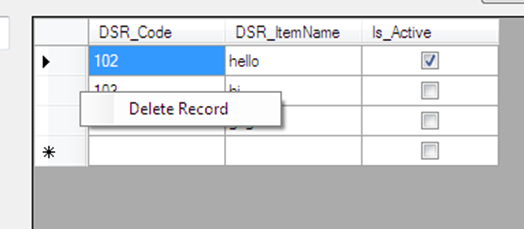
Firstly add contextMenuStrip from toolbox then write Delete Record in menu.
Second add CellMouseUp event in dataGridView and write the below code:

private void dataGridView1_CellMouseUp(object sender, DataGridViewCellMouseEventArgs e)
        {
          
            if (e.Button == MouseButtons.Right)
            {
                delete_is =Convert.ToInt32(dataGridView1.Rows[e.RowIndex].Cells["DSR_Code"].Value.ToString());
                this.contextMenuStrip1.Show(this.dataGridView1, e.Location);
                contextMenuStrip1.Show(Cursor.Position);
            }
        }

The output is


In last double click on Delete Record which is showing on contextMenuStrip


Write code on  deleteRecordToolStripMenuItem_Click

private void deleteRecordToolStripMenuItem_Click(object sender, EventArgs e)
        {
            SqlConnection con = new SqlConnection(cs);
            con.Open();
            SqlCommand com = new SqlCommand("delete from DSR_Master1 where DSR_Code=" + delete_is + "", con);
            com.ExecuteNonQuery();
            MessageBox.Show("Delete Successfully !");
            con.Close();
            datebind();
        }

Popular Posts