The main purpose of "Dot Net Labs" provide the dot net program. You can learn dot net, .Net Core, C#, SQL, Linq step-by-step.

Wednesday, 7 September 2016

How to save image in Database in asp.net with c#


In this article, Discuss about how to save  image in data base with asp.net with c#. Create a folder with name of Images in solution explorer 
example 


Database: -


 Source Code:-


<%@ Page Language="C#" AutoEventWireup="true" CodeFile="Default.aspx.cs" Inherits="_Default" %>

<!DOCTYPE html>
<html xmlns="http://www.w3.org/1999/xhtml">
<head runat="server">
    <title></title>
</head>
<body>
    <form id="form1" runat="server">
        <div>
            <center>
        <asp:Label runat="server" ID="lblmassage" ForeColor="White" BackColor="Black" BorderColor="Black"  Height="25px"></asp:Label><br /><br />
        <table style="border-collapse: 5; border-spacing: 5px">
            <tr>
                <td>Name</td><td>
                    <asp:TextBox ID="txtname" runat="server"></asp:TextBox></td>
                            </tr>
       
                        <tr>
                     <td colspan="2">
                    <asp:FileUpload ID="FileUpload1" runat="server" /></td>
                                        </tr>
             <tr>
                 <td colspan="2">
                <asp:Button runat="server" ID="btnsubmitt" Text="Submit" OnClick="btnsubmitt_Click"/></td>
                             </tr>
        </table>
               </center>
        </div>
    </form>
</body>
</html>


Code behind :


using System;
using System.Collections.Generic;
using System.Linq;
using System.Web;
using System.Web.UI;
using System.Web.UI.WebControls;
using System.Drawing;
using System.Data;
using System.Data.SqlClient;
using System.IO;

public partial class _Default : System.Web.UI.Page
{
    SqlConnection con = new SqlConnection(@"Data Source=amit-pc;Initial Catalog=hello;Integrated Security=True");
    protected void Page_Load(object sender, EventArgs e)
    {
        lblmassage.Visible = false;
    }
    protected void btnsubmitt_Click(object sender, EventArgs e)
    {
        con.Open();
        SqlCommand com = new SqlCommand("insert into image(name,image_name,image_path) values(@a,@b,@c)", con);
        com.Parameters.AddWithValue("@a",txtname.Text);

        if (FileUpload1.HasFile)
        {
            string filename = Path.GetFileName(FileUpload1.PostedFile.FileName);
            FileUpload1.SaveAs(Server.MapPath("~/Images/" + filename));
            com.Parameters.AddWithValue("@b", filename);
            com.Parameters.AddWithValue("@c", "~/Images/" + filename);
        }
        int i = com.ExecuteNonQuery();
        if (i == 1)
        {
            lblmassage.Visible = true;
            lblmassage.Text = "Registration Successfully !";
        }
        else
        {
            lblmassage.Visible = true;
            lblmassage.Text = "There are some problem, Please try again !";
        }
        con.Close();
    }
}

Output:-

 below image before input data
  below image after input data

 Database output after input data


 Thanks.........................
Sunday, 3 July 2016

Interface in c# with simple example


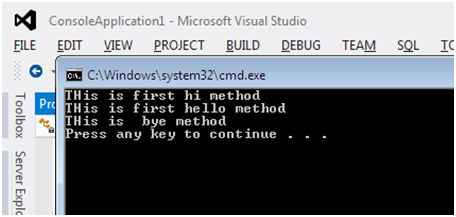
Hello friends, we will learn about interface in c#. An interface is declared using the keyword interface. The interface contains only abstract members, just like the classes interface also contains properties, methods, delegates, or events, but an only declaration, no implementations. An interface cannot be instantiated but can only be inherited by classes or other interfaces.

Example:

using System;
using System.Collections.Generic;
using System.Linq;
using System.Text;
using System.Threading.Tasks;

namespace ConsoleApplication1
{
    interface first
    {
        void hi();
        void hello();
    }
    class Test : first
    {
        public void hi()
        {
            Console.WriteLine("THis is first hi method");
        }
        public void hello()
        {
            Console.WriteLine("THis is first hello method");
        }
        public void bye()
        {
            Console.WriteLine("THis is  bye method");
        }
    }

    class Program
    {

        static void Main(string[] args)
        {
            first f = new Test();
            f.hi();
            f.hello();
            Test t1 = new Test();
            t1.bye();

        }
    }

}


There are two types of implementation of interfaces.
    • Implicit interface implementation
    • Explicit interface implementation

Example: The following is an example of Implicit interface implementation.

interface IEmployee

{

    void GetEmployee();

}


class Class1 : IEmployee

{


    public void GetEmployee()

    {

        Console.WriteLine("Implicit interface implementation.");

    }

 }


class Program

{

    static void Main(string[] args)

    {

        Class1 objClass1 = new Class1();

        objClass1.GetEmployee();

    }

}


Example: The following is an example of Explicit interface implementation.

interface IEmployee

{

    void GetEmployee();

}


interface IEmployee2

{

    void GetEmployee();

}


class Class1 : IEmployee, IEmployee2

{


    void IEmployee.GetEmployee()

    {

        Console.WriteLine("IEmployee Explicit interface inplementaion.");

    }


    void IEmployee2.GetEmployee()

    {

        Console.WriteLine("IEmployee2 Explicit interface inplementaion.");

    }

}


class Program

{

    static void Main(string[] args)

    {

          //Type 1

        Class1 objClass1 = new Class1();

        ((IEmployee)objClass1).GetEmployee();

        ((IEmployee2 )objClass1).GetEmployee();


        //Type 2


        IEmployee obj = new Class1();

        obj.GetEmployee();


         IEmployee2 obj = new Class1();

        obj.GetEmployee();


    }

}

Simple example of Property in C#


Hello friends, here we will learn properties in c#. Properties allow you to control the accessibility of a class variable, and way to access variables from the outside in c#.

Types of properties in C#
    • Read/Write properties - set and get
    • Read only properties - get only
    • Write only properties - set only
    • Auto implemented properties - public int Id {get;set;};

Example:

using System;
using System.Collections.Generic;
using System.Linq;
using System.Text;
using System.Threading.Tasks;

namespace ConsoleApplication1
{

    class Test
    {
        private int roll;
        private string name;
        public int Roll
        {
            get
            {
                return roll;
            }
            set
            {
                roll = value;
            }
        }
        public string Name
        {
            get
            {
                return name;
            }
            set
            {
                name = value;
            }

        }

    }
    class Program
    {

        static void Main(string[] args)
        {
            Test t = new Test();
            Console.WriteLine("Enter the roll no :");
            t.Roll = Convert.ToInt32(Console.ReadLine());
            Console.WriteLine("Enter the name");
            t.Name = Console.ReadLine();
            Console.WriteLine("Your roll no is " + t.Roll);
            Console.WriteLine("Your roll no is " + t.Name);


        }
   }
}


Thursday, 12 May 2016

Add two number in asp.net as a modular programming


using System;
using System.Collections.Generic;
using System.Linq;
using System.Text;
using System.Threading.Tasks;

namespace modularpro
{
    class test
    {
        int a, b, c;
        public void getdata()
        {
          
            Console.Write("Enter the a number : ");
            a = Convert.ToInt32(Console.ReadLine());
            Console.Write("Enter the b number : ");
            b = Convert.ToInt32(Console.ReadLine());
           
           
        }
        public void showdata()
        {
            c = a + b;
            Console.Write("Your is  :"+c);
           
        }
    }
    class Program
    {
        static void Main(string[] args)
        {
            test t1 = new test();
            t1.getdata();
            t1.showdata();
            Console.ReadLine();
        }
    }
}


The output is following :


Popular Posts